Safety you can live with day to day, not a museum piece.
Per tab: Box (every non-ASCII character becomes an inert box, coloured by risk class),
Reveal (each as a <U+XXXX> badge, to inspect exactly what is there), Detail
(the same badge with the codepoint's Unicode name inline, the safe default), and Show (render
legitimate unicode so you can read a log, each glyph still tinted by risk class (except inert box-drawing
and block elements, drawn in the program's own colour) - a homoglyph confusable
with ASCII wears a louder colour than honest foreign text, and a non-ASCII space is shown as a distinct
marker and copies as _, never as a space). The figure below is one ls listing
in all four.
Show does not mean run. All four modes remove escape sequences first (there is no
general escape parser in CLI mode), so nothing a program prints - a title change, a clipboard write, an
alternate screen, a jump to another line - is ever interpreted, in any mode, Show included. The mode
only changes how the remaining, already-safe characters are drawn, never whether escapes are honoured; the
only escapes honoured in every mode are safe colour and the four line-local edits described under
the current line.
The same ls listing, all four modes - three of the
filenames are lying (a right-to-left override, a Cyrillic look-alike, a zero-width space) and two are
honest non-ASCII (résumé.pdf, a CJK name).
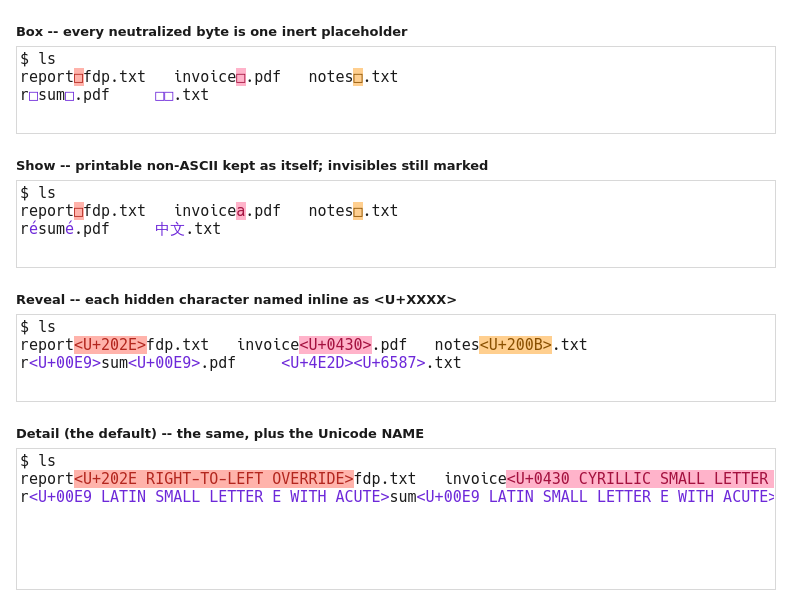 This is also the honest answer to "is it ASCII only?" - it is not, and the
panels show why. Box is ASCII in text but draws a non-ASCII placeholder glyph, and it boxes
honest non-ASCII too. Show deliberately keeps real printable non-ASCII, tinting a
look-alike rather than removing it. Reveal and Detail are pure ASCII, naming what was
hidden. What holds in every mode is narrower and more useful: no invisible, bidi or control character
reaches you unmarked.
This is also the honest answer to "is it ASCII only?" - it is not, and the
panels show why. Box is ASCII in text but draws a non-ASCII placeholder glyph, and it boxes
honest non-ASCII too. Show deliberately keeps real printable non-ASCII, tinting a
look-alike rather than removing it. Reveal and Detail are pure ASCII, naming what was
hidden. What holds in every mode is narrower and more useful: no invisible, bidi or control character
reaches you unmarked.
Paste anything with unicode or control characters and a review bar opens inside the window,
holding the paste before a byte reaches the shell. It shows the paste four ways - as it looks, each
hidden character named inline as a <U+XXXX> badge, and exactly what each send button
would deliver (stripped to ASCII, or with printable unicode kept) - all risk-coloured by the terminal's own
pipeline. Input is suspended and both send buttons are countdown-gated while it is held, so a stray key
reaches nothing. When to warn is configurable (always / only on unicode-or-control, the default / never);
never turns off the prompt, not the safety - a paste is always sanitised to ASCII, there is no
pass-through mode. A multi-line paste is held too, so a hidden second command cannot run the instant you
paste.
Copy is reviewed the same way, in the other direction - the same bar guards text leaving
via copy, configured separately because copy and paste are opposite trust directions. The two screenshots
below show both bars, and the review bar page walks through every part.
Save a tab's scrollback to a file. The saved file is lossless - each neutralized character is
named inline (<U+0430 CYRILLIC SMALL LETTER A>), never collapsed to a bare
_ - and pure ASCII unless you opted into Show mode's real glyphs. So it is safe to open in any
editor, unlike a normal terminal's raw log which can carry the very escapes this terminal refuses, and it
still records exactly what was there.
Signal keys reach the foreground program even in raw mode, and the Terminate action force-kills a program
that ignores everything. You are never stuck inside something you cannot get out of.
The OSC escapes that reach out of the grid - window title, desktop notification, clickable hyperlink,
clipboard write, clipboard read, palette change, working-directory report - are each a separate,
off-by-default toggle with a one-line note on what it exposes. (The iTerm2 OSC 1337 extensions have
no toggle - they can never be safely enabled, so they are always neutralised.) A three-part
security indicator dims from green toward red as you enable riskier features. When a program tries
to use a feature you left off, a dismissible banner tells you once per feature per tab - visible but
never nagging, and silenceable globally or per feature.
The same neutralization, for text you paste into other programs - an editor, a chat box, anything
that does not treat unicode as carefully. sclip is a tiny filter that reads text and writes it
back clipboard-safe: strictest by default (printable ASCII plus tab and newline, so an invisible, bidi or
homoglyph character cannot ride out), or --unicode to keep printable non-ASCII. It composes with
the system clipboard tools, and drop-in wrappers - st-wl-paste, st-wl-copy,
st-xclip - run the pipeline for you.
Or run it as a tray watcher (secure-terminal --clipboard-watch, no terminal window):
copy something deceptive and the same in-window review bar pops up and offers to replace it -
flag-and-offer, never a silent rewrite. You choose Keep original, Replace (ASCII), or Replace (keep
unicode). Honest limit: keeping unicode keeps printable look-alikes too (a homoglyph is printable
unicode); only the ASCII strip removes them, which is why the preview names every character so you can judge.
It sanitises the local clipboard; on Qubes the inter-VM global clipboard is untouched - run it after
pasting into the target VM.
You can also drive the watcher from an open terminal: View > Clipboard sanitizer (and the
right-click menu) start / stop it, toggle the warn-on-any-non-ASCII mode, review the clipboard on demand,
and set start-on-login. Since it is a tray app, turning the terminal's system tray off also turns its
autostart off.